In the rapidly evolving landscape of digital forensics and incident response (DFIR), investigators face an ever-growing challenge: extracting, analyzing, and making sense of data from an expanding universe of devices, applications, and data sources. From smartphones and computers to cloud services and IoT devices, the volume and complexity of digital evidence continue to grow exponentially.
Belkasoft X (formerly known as Belkasoft Evidence Center X) has established itself as a leading comprehensive solution in this demanding field. Trusted by law enforcement agencies, government bodies, and corporate security teams worldwide, Belkasoft X combines robust acquisition capabilities, advanced analytical tools, and cutting-edge artificial intelligence to help investigators find the truth faster and more efficiently.
This comprehensive guide explores every facet of Belkasoft X, from its core forensic capabilities to its innovative AI-powered features, reporting tools, and real-world applications. Whether you’re a seasoned digital forensics professional evaluating your next toolset or an organization looking to build internal DFIR capabilities, this article provides the detailed information you need.
What is Belkasoft X?
Belkasoft X is a flagship digital forensics and incident response platform designed to extract, analyze, and report on digital evidence from a wide range of sources. The tool supports:
- Mobile devices (iOS and Android smartphones and tablets)
- Computers (Windows, macOS, Linux)
- Cloud services (Google Drive, iCloud, and others)
- Memory dumps (RAM analysis)
- IoT devices (drones, smart devices)
The platform is built to handle the complete forensic workflow: evidence acquisition, parsing, analysis, and reporting—all within a single, unified interface.
Company Background
Belkasoft is a global provider of DFIR solutions with a strong reputation for innovation, particularly in the application of artificial intelligence to forensic workflows. The company has spent years working alongside the DFIR community, developing tools shaped by real investigative workflows rather than theoretical use cases.
As Yuri Gubanov, CEO of Belkasoft, stated: “Implementing AI in digital forensics is not just about capability—it is about finding the right balance between powerful features and the ability to deploy them securely, within the constraints of real investigative environments”.
Evolution and Version History
Belkasoft X has evolved significantly over the years:
- Belkasoft Evidence Center X – The original flagship product name
- Version 2.3 – Introduced brute-force passcode module for iOS and Android devices
- Version 2.8 – Expanded AI analysis to Cellebrite extraction files
- Current Version – Features integrated BelkaGPT AI assistant with advanced capabilities including speech recognition and facial recognition
Validation and Certification
Belkasoft X has undergone rigorous testing by government agencies. The U.S. Department of Homeland Security (DHS) Science and Technology Directorate has published multiple test reports for Belkasoft X through its Computer Forensics Tool Testing (CFTT) program.
Available test reports include:
- Test Results for Belkasoft X Version 1.10.8387 (January 2023)
- Test Results for Belkasoft Evidence Center X v2.5.16519 (May 2025)
- Test Results for Belkasoft Evidence Center X v2.7.19314 (August 2025)
This government validation provides an additional layer of confidence for agencies requiring court-admissible evidence processing.
Chapter 2: Core Forensic Capabilities
2.1 Mobile Device Forensics
Mobile device acquisition is one of Belkasoft X’s cornerstone capabilities. The tool supports both iOS and Android devices through multiple extraction methods.
iOS Acquisition
Belkasoft X supports various iOS acquisition methods, including:
- Logical acquisition (backup extraction)
- File system acquisition (on compatible devices)
- Keychain extraction
- Brute-force passcode unlocking (available for qualified agencies)
Recent updates have delivered enhanced Biome (SEGB) conversation extraction, improved Discord message parsing, updated Snapchat support, improved SMS contact display, and new support for Zalo—the widely-used Vietnamese messaging platform.
Android Acquisition
Android support includes:
- Full file system acquisition (on rooted or exploit-supported devices)
- Logical acquisition via ADB
- Physical acquisition via chip-off (compatible with external tools)
- Application data extraction
The platform has added support for 40+ smartphones, including the latest Samsung Galaxy, Moto, OnePlus, Oppo, Honor, Realme, and Redmi devices.
Brute-Force Passcode Module
A significant addition in version 2.3 was the new module for brute-forcing passcodes for iOS and Android devices. This capability is available through:
- Government customers: Paid upgrade option
- Corporate customers: Included in X Scale edition and higher
Belkasoft also offers a free brute-force tool for law enforcement agencies in selected countries, supporting certain iPhone and iPad models.
2.2 Computer Forensics
Belkasoft X provides comprehensive computer forensics capabilities across all major operating systems.
Windows Forensics
- NTFS, FAT, exFAT, ReFS file system support
- Registry analysis (hives, userassist, recent docs, USB history)
- Event log parsing
- Prefetch files
- Shellbags
- Jumplists
- Thumbcache
- Recycle Bin
Belkasoft offers free on-demand training courses, including a “Windows Forensics with Belkasoft” course that provides a 30-day trial license, video tutorials, practical tasks, and CPE credits upon completion.
macOS Forensics
- HFS+ and APFS file system support
- Plist parsing
- Spotlight index analysis
- Keychain extraction
Linux Forensics
- Ext2/3/4 file system support
- System log analysis
- Application artifact parsing
2.3 Cloud and Memory Forensics
Cloud Forensics
Belkasoft X can acquire and analyze data from major cloud services:
- Google Drive
- iCloud (backups, photos, messages)
- Microsoft OneDrive
- Dropbox
The platform supports extraction using credentials when available, enabling investigators to access cloud-stored evidence without physical device access.
Memory Forensics
RAM analysis capabilities include:
- Process listing and analysis
- Network connection extraction
- Decryption key recovery
- Malware detection
2.4 Supported File Formats and Artifacts
Belkasoft X’s parsing engine covers an extensive range of applications and file types.
Messaging Applications
| Platform | Support Level |
|---|---|
| Full (including encrypted backups) | |
| Signal | Message extraction |
| Telegram | Full |
| Viber | Full |
| Snapchat | Updated support |
| Discord | Improved message parsing |
| Zalo | New support (Vietnamese platform) |
| Full | |
| Line | Full |
Email and Documents
- Outlook (PST/OST)
- Thunderbird
- Apple Mail
- Microsoft Office documents
- PDF files
- RTF, TXT
Browsers
- Chrome, Edge, Internet Explorer
- Firefox
- Safari
- Opera
Media files, system logs, and thousands of other artifact types are also supported.
2.5 Third-Party Case Import
One of Belkasoft X’s most practical features is its ability to import cases from other forensic tools, allowing investigators to apply BelkaGPT’s AI capabilities to data already processed elsewhere—without reprocessing evidence.
Supported import formats include:
- Magnet Axiom (.mfdb) – browsers, Office documents, emails, media files, passwords, tokens, Jumplists
- Cellebrite UFED (UFD, UFDX, UFDR) – full case data including metadata such as device names, extraction types, backup passwords, chats, emails, documents, and pictures
This interoperability is crucial for forensic teams that may use multiple tools depending on case requirements. Rather than choosing between platforms, investigators can leverage each tool’s strengths and bring everything together in Belkasoft X for AI-assisted analysis.
Chapter 3: BelkaGPT – The AI-Powered Investigative Assistant
Perhaps the most distinguishing feature of Belkasoft X is BelkaGPT, an offline AI assistant integrated directly into the platform. Unlike cloud-based AI solutions that require sending potentially sensitive data to external servers, BelkaGPT operates entirely locally, ensuring that case data never leaves the forensic lab.
3.1 Key Principles
BelkaGPT is built on several core principles:
- Offline operation – No internet connection required; all processing happens on local hardware
- Data privacy – Sensitive case data never leaves the investigator’s control
- Practical design – Developed based on real DFIR workflows, not theoretical capabilities
- No specialized hardware required – Runs on standard forensic workstations
3.2 Picture Analysis Capabilities
When investigators face tens of thousands of images in a single case, manual review is neither practical nor sustainable. BelkaGPT transforms visual evidence review from a bottleneck into a structured workflow through four powerful capabilities.
Predefined and Custom Classification
BelkaGPT ships with a range of predefined classifiers covering common investigative categories. However, its real strength lies in custom classifiers. Investigators can define their own categories on the fly using natural language instructions—no coding required. Examples include:
- Workplace access badges
- Improvised explosive devices
- Suspicious packages
- Specific weapons types
- Drug paraphernalia
This adaptability means investigators are never constrained by what a developer anticipated in advance.
Comprehensive Image Descriptions
For every analyzed picture, BelkaGPT generates detailed descriptions covering:
- People: Appearance, clothing, tattoos, activities
- Objects of investigative interest: Weapons, drugs, documents, devices
- Locations: Indoor/outdoor settings, recognizable landmarks
- Contextual details: Lighting, weather, time of day indicators
All descriptions are indexed and searchable, enabling investigators to locate relevant images in seconds. The AI-generated text can also be incorporated directly into digital forensic reports.
Intelligent Natural Language Search
Once pictures are analyzed, investigators can search using conversational language:
- “Show me photos taken in parking garages”
- “Find images containing Bitcoin QR codes”
- “Find pictures with people wearing masks”
- “Show me screenshots of banking apps”
This flexibility allows investigations to adapt in real time as new leads emerge, without requiring technical queries or specialized training.
Facial Recognition
BelkaGPT provides comprehensive facial recognition capabilities:
- Automated clustering: Faces are automatically grouped across all pictures in a data source
- Reference image search: Upload a reference photo to search for similar faces across all case evidence
- Similarity ranking: Results are sorted by similarity rate down to 50%, with the strongest leads surfacing first
- Cross-scene identification: Detect individuals appearing in multiple photos, helping identify suspects, accomplices, victims, or witnesses
The system detects similar faces even when lighting, angles, or image quality vary significantly.
3.3 Speech Recognition and Audio Analysis
Belkasoft X now includes automatic speech recognition (ASR) capabilities, enabling transcription of audio and video recordings directly within the platform.
Supported Languages
BelkaGPT supports European, Asian, and Semitic languages, making it suitable for multilingual investigations.
Key Features
- Timestamped transcripts – Each transcription includes time references, allowing investigators to navigate directly to relevant portions
- Automatic processing – ASR can run automatically when a data source is added to a case
- Selective processing – Run on selected items and filtered subsets for full control
- Natural language search – Query transcripts conversationally; BelkaGPT understands context, surfacing implied meanings and indirect references, not just exact word matches
Real-World Application Example
As documented in Belkasoft’s guide, querying in the same language as target content—rather than defaulting to English—can surface evidence that would otherwise be missed. For example, asking “Are there any mentions of investment fraud?” or “Find voice messages containing threats” retrieves the most relevant results across case data.
3.4 Context-Aware Chat
Recent updates have transformed BelkaGPT from a simple query tool into a genuine investigative partner.
Enhanced capabilities include:
- Conversational context maintenance – The Q&A chat maintains full conversational context within a topic, allowing investigators to ask follow-up questions, narrow date ranges, and redirect toward specific artifact types across a continuous dialogue
- Expanded relevance scoring – Evaluates between 3 and 10 of the most pertinent artifacts per question (up from a fixed ceiling of three)
- Secondary analysis layer – Ensures answers are grounded only in evidence that truly matches the query
- Improved natural language interpretation – Delivers more concise and actionable responses
3.5 BelkaGPT Hub: Enterprise AI Processing
For forensic teams and larger organizations, BelkaGPT Hub enables distributed AI processing across shared infrastructure.
Key features:
- Media file processing – Supports picture description, classification, and facial recognition preprocessing
- Shared GPU infrastructure – Teams can distribute AI tasks across GPU-equipped servers
- No per-workstation GPUs required – Expensive hardware is centralized, reducing costs for individual examiners
- Complete pipeline support – The entire AI analysis workflow can be offloaded to shared infrastructure
This architecture makes AI-assisted investigations more streamlined and efficient for organizations of any size.
Chapter 4: Data Acquisition Methods
Belkasoft X supports multiple acquisition methods depending on the target device and case requirements.
4.1 Physical Acquisition
Physical acquisition creates a bit-for-bit copy of the entire storage device, potentially recovering deleted files, unallocated space data, and hidden partitions.
Supported physical acquisition methods:
- JTAG (Joint Test Action Group) – via compatible hardware
- Chip-off – physical removal of memory chip (works with external tools)
- ISP (In-System Programming)
4.2 Logical Acquisition
Logical acquisition extracts data through the device’s operating system, typically via backup files or file system access.
Android logical acquisition:
- ADB (Android Debug Bridge) backup
- OEM backup tools
- Agent installation (for supported scenarios)
- QR code-based extraction (airplane mode recommended)
iOS logical acquisition:
- iTunes backup extraction
- iCloud backup download (requires credentials)
- File system extraction (compatible devices)
4.3 Over-the-Air Acquisition
Belkasoft X supports remote acquisition methods including:
- Wi-Fi acquisition (requires unlocked Android 4.x or higher)
- Agent-based acquisition
- QR code scanning for Android
4.4 Cloud Acquisition
Cloud acquisition requires credentials for the target service. Belkasoft X supports extraction from:
- Google Drive (requires Google account credentials)
- iCloud (requires Apple ID credentials)
- Other cloud storage services
Chapter 5: Analysis Tools and Workflows
5.1 Dashboard and Case Management
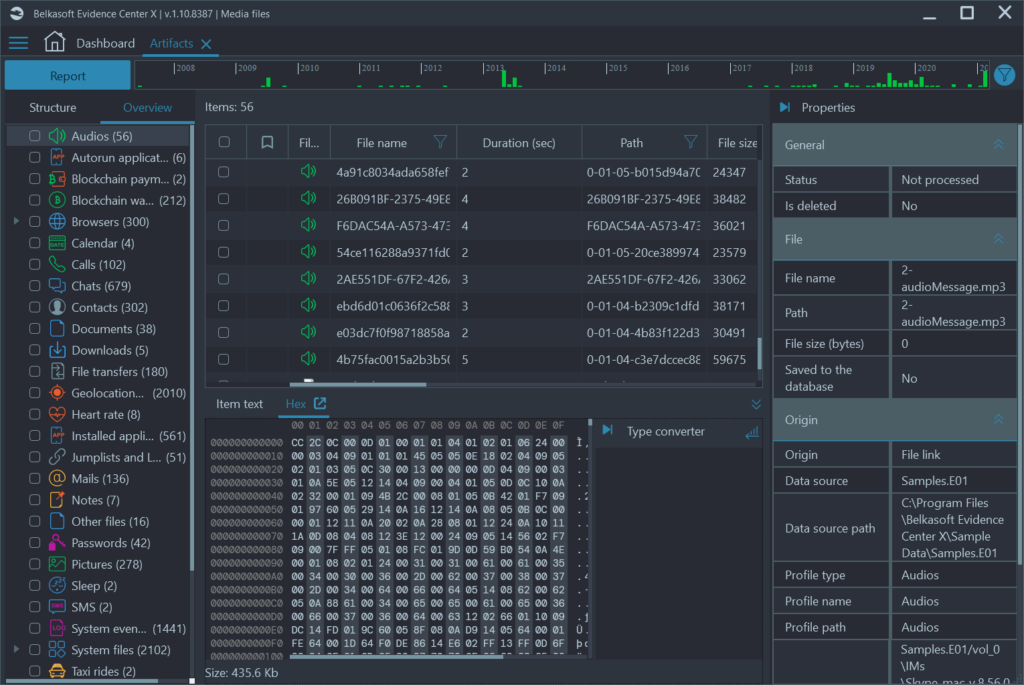
When opening a case in Belkasoft X, investigators are presented with the Dashboard window, which provides an overview of:
- Case information (investigator name, timezone, creation date)
- Data sources added to the case
- Automatic search results (city names, phone numbers, email addresses, names)
From this central interface, investigators can add data sources, search artifacts, create reports, export to Evidence Reader, create key dictionaries, prepare log files, or delete cases.
5.2 Artifact Discovery and Navigation
Belkasoft X organizes extracted artifacts in a hierarchical tree structure. For example:
- SQLite (3,442 artifacts)
- Geolocation data (1,218)
- Pictures (317)
- Chats (315)
- Contacts (100)
- Calls (55)
- URLs (25)
This organized presentation makes navigating large datasets manageable.
5.3 Search and Filtering
As investigations progress, investigators can refine their focus using multiple techniques:
| Technique | Description |
|---|---|
| Bookmarks | Save relevant artifacts to organized categories |
| Keyword searches | Locate artifacts containing specific terms or expressions |
| Filters | Apply based on categories, date/time ranges, or other criteria |
| Sorting | Organize artifact lists for easy navigation |
5.4 Connection Graph
The Connection Graph is a powerful visualization tool that displays interactions between individuals—calls, chats, file transfers, and other communications.
Capabilities:
- Visualize relationships in an intuitive graphical format
- Export visuals directly to PDF
- Modify the graph to highlight important relationships
- Quickly identify key connections and tightly knit groups or communities
- Provide clear visual evidence suitable for court presentations
5.5 SQLite Viewer
Belkasoft X includes an SQLite Viewer for examining database contents in depth.
Use cases:
- Investigating rare or unsupported applications
- Finding extra fields that automatic parsing does not show
- Running custom SQL queries for targeted analysis
Export options: TXT, CSV, XLSX, HTML, XML, DOCX, PDF
5.6 Timeline Analysis
Chronological organization of events helps investigators reconstruct sequences of activities. Belkasoft X supports timeline-based analysis with filtering by date ranges and artifact types.
5.7 Map View and Geolocation
Geolocation data from devices can be plotted and visualized on maps. Export options include KML (Keyhole Markup Language) for use with external mapping tools like Google Earth, or direct integration into PDF reports.
Chapter 6: Reporting and Export
A forensic investigation is only as strong as the report that communicates its findings. Belkasoft X provides comprehensive reporting tools that turn complex technical findings into defensible narratives understandable by investigators, management, or courts.
6.1 Selecting Artifacts for Reports
Reports can be generated at any stage of an investigation:
Case-wide reports – Generated from the Dashboard, covering all artifacts in the case
Focused reports – Created from:
- Individual artifacts selected in grid view
- Artifact profiles (nodes containing data from specific apps or system files)
- Data types (specific conversations or artifact categories)
6.2 Supported Report Formats
Belkasoft X offers an extensive range of report formats for different scenarios:
| Format | Best For |
|---|---|
| Textual (TXT, HTML, PDF, DOCX) | General documentation, court presentations |
| Structured data (XML) | Automated data sharing with external systems |
| Spreadsheet (CSV, XLSX) | Analysis in Excel or similar tools |
| Email-specific (EML) | Email artifact storage and analysis |
| Geospatial (KML) | Google Earth and mapping tools |
| VICS / S21 | Specialized law enforcement systems |
| RSMF (Relativity Short Message Format) | eDiscovery platforms like Relativity |
6.3 Report Customization
Fine-tune reports with advanced options:
Formatting:
- Sort artifacts by date or metadata
- Add headers and footers
- Change page orientation
- Customize date and time formats
Styling:
- Add organization logo
- Modify report fonts
Splitting and grouping:
- Create separate report files for each profile or data type
- Split by contact or record count for easier review
Embedded evidence:
- Link original files in reports
- Copy embedded files
- Obscure sensitive photos
Selective metadata:
- Include or exclude specific artifact columns
- Keep reports relevant and concise
6.4 Visual Reports
Connection Graph Reports – Export relationship visualizations to PDF. Modify graphs to highlight important relationships before export.
Map View Reports – Integrate geospatial data visualizations directly into PDF reports.
Bubble Chat View – Export chat conversations in a user-friendly bubble view format, making message threads easy to follow.
6.5 AI Findings Documentation
Modern AI solutions save significant time, but AI-generated evidence must meet the same legal standards as any other investigative finding. Belkasoft X allows creation of reports directly from each BelkaGPT topic, preserving:
This documentation supports admissibility in formal reporting and demonstrates the investigative methodology used.
6.6 Evidence Reader: Portable Case Sharing
For sharing findings with stakeholders who do not have Belkasoft X installed, the platform supports export to Belkasoft Evidence Reader—a free, portable viewer. Export entire cases or specific subsets with all BelkaGPT findings included.
Chapter 7: Deployment and Licensing
7.1 Editions and Packages
Belkasoft X is available in multiple editions to suit different organizational needs:
Academic Licensing – Belkasoft offers deeply discounted packages for academic institutions with up to 98% off commercial pricing:
| Package | Standard | +BelkaGPT |
|---|---|---|
| 10 concurrent users | $3,000 USD/EUR | $5,000 USD/EUR |
| 30 concurrent users | $6,500 USD/EUR | $10,000 USD/EUR |
| 50 concurrent users | $9,000 USD/EUR | n/a |
Academic packages include computer and mobile forensics, cloud and memory analysis, visual components like Connection Graph, and are licensed with a network dongle for easy management in virtualized environments.
Corporate Licensing – Contact Belkasoft for custom pricing. Features vary by edition (Standard, X Scale, Enterprise).
Government Pricing – Special considerations and licensing options available for law enforcement and government agencies. The brute-force passcode module is available as a paid upgrade for government customers.
7.2 Free Trial and Training
Belkasoft provides multiple ways to evaluate and learn the platform at no cost.
On-demand training courses (offered periodically):
- Windows Forensics with Belkasoft (6 CPE credits)
- Android Forensics with Belkasoft (6 CPE credits)
Each course includes:
- Free 30-day trial license for Belkasoft X
- Video tutorials and pre-recorded webinars
- Practical tasks
- Certificate of completion and achievement
Free trial – Available upon request through the Belkasoft website.
7.3 System Requirements
Belkasoft X runs on Windows operating systems (Windows 10/11, Windows Server 2016/2019/2022). Hardware requirements vary based on case size and whether AI processing is enabled.
Minimum requirements:
- 64-bit processor
- 16 GB RAM (32 GB+ recommended for large cases)
- SSD storage
- Windows-compatible GPU
AI acceleration – GPU with CUDA support recommended for BelkaGPT picture analysis and facial recognition. Organizations using BelkaGPT Hub can centralize GPU resources on shared infrastructure.
7.4 Software Maintenance and Support
Customers with active Software Maintenance and Support (SMS) contracts receive free upgrades to new versions. Upgrading from previous versions of Belkasoft X to newer versions is free for customers with an active SMS contract. Customers with expired or expiring contracts may review and renew them through the Customer Portal.
Chapter 8: User Experience and Reviews
8.1 Positive Feedback
According to user reviews aggregated on Gartner Peer Insights, Belkasoft X receives favorable feedback for several key aspects:
Well-designed interface – Users report that the interface is intuitive and easy to navigate, reducing the learning curve for new examiners.
Variety of features – The comprehensive feature set means investigators can handle most tasks within a single platform.
Ease of use – Users note that it doesn’t take long to become comfortable with the tool.
8.2 Constructive Feedback
Some users have noted areas for improvement:
Technical support – While support is available, some users have expressed interest in telephone-based support options in addition to existing channels.
8.3 Comparison with Competitors
Belkasoft X competes in the DFIR space with established tools including:
| Tool | Key Differentiators |
|---|---|
| Cellebrite UFED | Industry standard for mobile; deep physical extraction |
| Magnet AXIOM | User-friendly; cloud and computer focus |
| Oxygen Forensic Detective | Strong mobile app decoding |
| MSAB XRY | Speed and decoding accuracy |
Belkasoft X distinguishes itself through:
- Integrated offline AI (BelkaGPT)
- Strong interoperability with competitors’ case files
- Comprehensive coverage across mobile, computer, cloud, and memory
- Competitive academic pricing
Chapter 9: Real-World Applications and Case Studies
9.1 Law Enforcement
Scenario: A suspect in a criminal investigation uses encrypted messaging apps and regularly changes devices.
Belkasoft X approach:
- Acquire all devices (phone, tablet, computer)
- Extract application data from WhatsApp, Signal, and Telegram
- Run BelkaGPT picture analysis to identify relevant images across all devices
- Use Connection Graph to map communication networks
- Generate court-ready reports with AI findings documented
9.2 Corporate Incident Response
Scenario: A company suspects data exfiltration by a departing employee.
Belkasoft X approach:
- Image employee’s work computer and personal phone (with authorization)
- Analyze browser history, USB device connections, and email
- Search for keywords related to competitor names or sensitive documents
- Build timeline of suspicious activities
- Export findings to Evidence Reader for legal team review
9.3 Internal HR Investigation
Scenario: An investigation into workplace harassment involving voice messages and images.
Belkasoft X approach:
- Extract messaging app data from involved parties’ devices
- Transcribe voice messages using BelkaGPT speech recognition
- Run picture classification to identify relevant images
- Search transcripts for threats or harassing language
- Generate report with bubble chat view and transcripts
Chapter 10: Limitations and Considerations
10.1 Technical Limitations
Passcode bypass – The brute-force module works on selected iOS and Android devices only. Not all models or OS versions are supported.
Acquisition requirements – Physical acquisition may require specialized hardware or exploit availability. Not all devices can be fully extracted.
AI accuracy – While powerful, AI analysis (including facial recognition and classification) is probabilistic rather than absolute. Human verification is recommended for critical findings.
10.2 Deployment Considerations
Windows-only – Belkasoft X requires Windows, which may be a limitation for macOS-based forensic labs.
Hardware requirements – Large cases and AI processing benefit significantly from high-spec hardware (RAM, SSD, GPU).
Network licensing – Academic and enterprise licenses use network dongles, requiring infrastructure planning for virtualized environments.
10.3 Regulatory and Compliance
Data privacy – Offline AI ensures sensitive data never leaves the lab, but organizations must still comply with local evidence handling regulations.
Admissibility – Proper documentation is essential. Belkasoft X’s reporting tools support this, but investigators must follow proper chain-of-custody procedures.
Chapter 11: Future Outlook
Belkasoft continues to invest heavily in AI-powered capabilities while maintaining its commitment to offline, privacy-preserving operation.
11.1 Recent Developments (2025-2026)
- Speech recognition integration (April 2026)
- Extended Cellebrite compatibility for AI analysis (August 2025)
- Expanded mobile device support (40+ new smartphones)
- Enhanced BelkaGPT capabilities (conversational context, improved relevance scoring)
11.2 Roadmap Focus Areas
Based on public information and industry trends, expected focus areas include:
- Additional language support for speech recognition
- Expanded cloud service acquisition
- Enhanced automation workflows
- Further AI integration across additional artifact types
- Continued interoperability with competitor formats
Conclusion
Belkasoft X represents a comprehensive, forward-thinking solution in the digital forensics and incident response space. Its combination of traditional forensic capabilities—mobile and computer acquisition, artifact parsing, visualization—with cutting-edge offline AI through BelkaGPT creates a powerful platform for modern investigations.
Key strengths include:
- Versatility – Mobile, computer, cloud, and memory forensics in one platform
- AI integration – Offline picture analysis, facial recognition, and speech recognition that respects data privacy
- Interoperability – Import from Cellebrite and Magnet Axiom, reducing vendor lock-in
- Reporting – Extensive format support and customization options for any audience
- Accessibility – Academic pricing and free training courses lower the barrier to entry
- Government validation – DHS CFTT testing provides confidence for law enforcement use
Potential considerations:
- Windows-only deployment
- Hardware requirements for AI processing (mitigated by BelkaGPT Hub)
- Passcode bypass limited to supported devices
For law enforcement agencies, corporate security teams, and academic institutions, Belkasoft X offers a compelling combination of power, flexibility, and innovation. As digital evidence continues to grow in volume and complexity, tools that can efficiently process data while maintaining forensic integrity and privacy will become increasingly essential. Belkasoft X is well-positioned to meet these challenges.
References
Belkasoft. (2025). Noticias de Belkasoft. https://belkasoft.com/es/news
Belkasoft. (2025). DFIR Reports with Belkasoft X. https://belkasoft.com/dfir-reports-with-belkasoft-x
Forensic Focus. (2026). Belkasoft X Streamlines Investigations With AI-Powered Picture Analysis. https://www.forensicfocus.com/news/belkasoft-x-streamlines-investigations-with-ai-powered-picture-analysis/
Belkasoft. Academic License Request. https://belkasoft.com/belkasoft-x-academic-license-request
Gartner Peer Insights. Belkasoft X vs Ivanti Connect Secure. https://www.gartner.com/reviews/market/it-security/compare/product/belkasoft-x-vs-ivanti-connect-secure
U.S. Department of Homeland Security. (2025). S&T Mobile Device Acquisition. https://www.dhs.gov/publication/st-mobile-device-acquisition
Forensic Focus. (2026). Belkasoft Advances AI-Assisted DFIR With Major Update To Belkasoft X And BelkaGPT. https://www.forensicfocus.com/news/belkasoft-advances-ai-assisted-dfir-with-major-update-to-belkasoft-x-and-belkagpt/
Forensic Focus. (2026). Belkasoft X Brings AI-Powered Speech Recognition To DFIR Investigations. https://www.forensicfocus.com/news/belkasoft-x-brings-ai-powered-speech-recognition-to-dfir-investigations/
Belkasoft. (2024). What’s new in Belkasoft X v.2.3. https://belkasoft.com/whats_new_in_belkax_2_3
Afanasov, A.K. (2021). Bachelor Thesis (Mobile Forensics Tool Comparison). Saint Petersburg State University.